SpringBoot数据访问
SpringBoot 数据库访问 JDBC访问数据库 整合Druid数据源 整合MyBatis 整合JPA
Page content
SpringBoot访问数据库
springboot 默认支持很多数据源 有:Hikari,Tomcat, Dbcp2,Generic。 springboot2.X默认数据源为:Hikari。下面还会讲到切换数据源到阿里的Druid, 同时和springboot桥接进行数据库访问的方式也有很多:JDBC,Mybatis,JPA
源码:DataSourceAutoConfiguration –>PooledDataSourceConfiguration可以看到数据源的配置
@Configuration
@Conditional({DataSourceAutoConfiguration.PooledDataSourceCondition.class})
@ConditionalOnMissingBean({DataSource.class, XADataSource.class})
@Import({Hikari.class, Tomcat.class, Dbcp2.class, Generic.class, DataSourceJmxConfiguration.class})
protected static class PooledDataSourceConfiguration {
    protected PooledDataSourceConfiguration() {
    }
}
JDBC访问数据库
1. 准备工作
pom.xml
<dependency>
<groupId>org.springframework.boot</groupId>
<artifactId>spring-boot-starter-jdbc</artifactId>
</dependency>

<dependency>
<groupId>mysql</groupId>
<artifactId>mysql-connector-java</artifactId>
<version>5.1.47</version>
</dependency>
application.yml
spring:
datasource:
username: root
password:
url: jdbc:mysql://localhost:3306/jdbc
driver-class-name: com.mysql.jdbc.Driver
2. 创建表
springboot创建表相关源码, 通过
DataSourceInitializer拿到数据源,可以创建表结构或者表数据
//创建表结构
public boolean createSchema() {
    List<Resource> scripts = this.getScripts("spring.datasource.schema", this.properties.getSchema(), "schema");
    if (!scripts.isEmpty()) {
        if (!this.isEnabled()) {
            logger.debug("Initialization disabled (not running DDL scripts)");
            return false;
        }

        String username = this.properties.getSchemaUsername();
        String password = this.properties.getSchemaPassword();
        this.runScripts(scripts, username, password);
    }
    return !scripts.isEmpty();
}
//初始化表数据
public void initSchema() {
        List<Resource> scripts = this.getScripts("spring.datasource.data", this.properties.getData(), "data");
        if (!scripts.isEmpty()) {
            if (!this.isEnabled()) {
                logger.debug("Initialization disabled (not running data scripts)");
                return;
            }

            String username = this.properties.getDataUsername();
            String password = this.properties.getDataPassword();
            this.runScripts(scripts, username, password);
        }

    }
//执行sql语句
private void runScripts(List<Resource> resources, String username, String password) {
        if (!resources.isEmpty()) {
            ResourceDatabasePopulator populator = new ResourceDatabasePopulator();
            populator.setContinueOnError(this.properties.isContinueOnError());
            populator.setSeparator(this.properties.getSeparator());
            if (this.properties.getSqlScriptEncoding() != null) {
                populator.setSqlScriptEncoding(this.properties.getSqlScriptEncoding().name());
            }

            Iterator var5 = resources.iterator();

            while(var5.hasNext()) {
                Resource resource = (Resource)var5.next();
                populator.addScript(resource);
            }

            DataSource dataSource = this.dataSource;
            if (StringUtils.hasText(username) && StringUtils.hasText(password)) {
                dataSource = DataSourceBuilder.create(this.properties.getClassLoader()).driverClassName(this.properties.determineDriverClassName()).url(this.properties.determineUrl()).username(username).password(password).build();
            }

            DatabasePopulatorUtils.execute(populator, dataSource);
        }
    }
//获得脚本
private List<Resource> getScripts(String propertyName, List<String> resources, String fallback) {
        if (resources != null) {
            return this.getResources(propertyName, resources, true);
        } else {
            String platform = this.properties.getPlatform();
            List<String> fallbackResources = new ArrayList();
            fallbackResources.add("classpath*:" + fallback + "-" + platform + ".sql");
            fallbackResources.add("classpath*:" + fallback + ".sql");
            return this.getResources(propertyName, fallbackResources, false);
        }
    }
通过以上源码可以知道,想要执行创建表结构或者表数据的sql语句,默认将sql文件的名称修改为:
- schema-*.sql
- data-*.sql
或者在配置文件中直接指定:
spring:
  datasource:
    username: root
    password:
    url: jdbc:mysql://localhost:3306/jdbc
    driver-class-name: com.mysql.jdbc.Driver
    schema:
      - classpath:department.sql
    initialization-mode: always
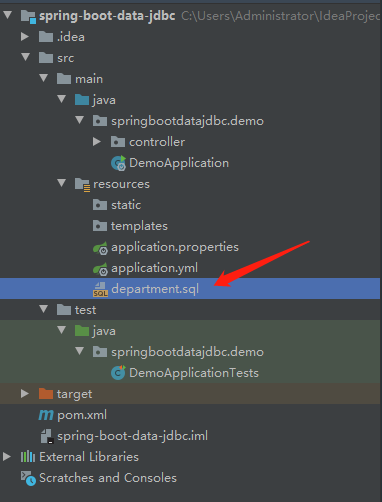
department.sql
DROP TABLE IF EXISTS `department`;
CREATE TABLE `department` (
  `id` int(11) NOT NULL AUTO_INCREMENT,
  `departmentName` varchar(255) DEFAULT NULL,
  PRIMARY KEY (`id`)
) ENGINE=InnoDB AUTO_INCREMENT=1 DEFAULT CHARSET=utf8;
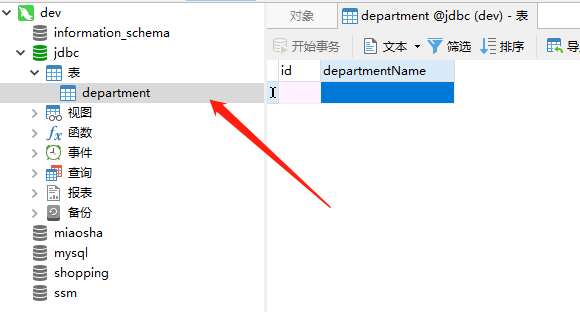
直接运行Application,就可以生成表结构:
3. 简单查询
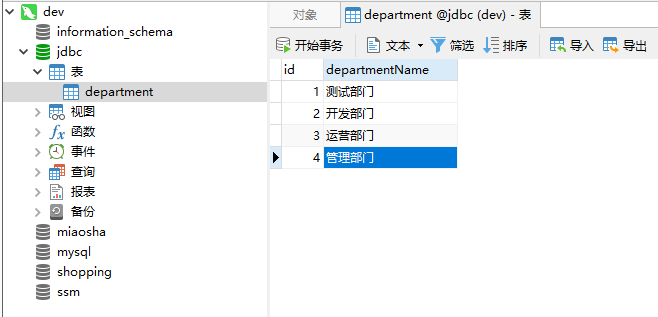
表数据
Controller
/**
 * @program: spring-boot-data-jdbc
 * @description: 通过JDBC的方式操作数据库
 * @author: YuanChangYue
 * @create: 2019-08-20 12:11
 */
@Controller
public class JDBCController {

    @Autowired
    JdbcTemplate jdbcTemplate;

    @GetMapping("/deps")
    @ResponseBody
    public List<Map<String, Object>> queryList() {
        return jdbcTemplate.queryForList("select * from department");
    }

}
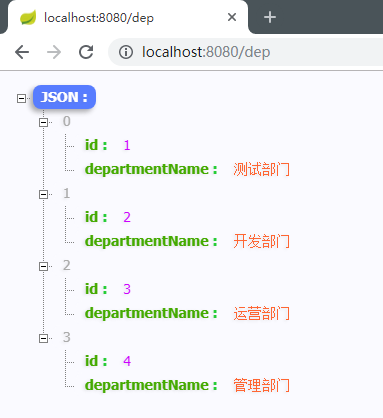
查询结果
整合Druid数据源
1. 添加maven依赖
<!-- https://mvnrepository.com/artifact/com.alibaba/druid -->
<dependency>
  <groupId>com.alibaba</groupId>
  <artifactId>druid</artifactId>
  <version>1.1.10</version>
</dependency>

<!-- https://mvnrepository.com/artifact/log4j/log4j -->
<dependency>
  <groupId>log4j</groupId>
  <artifactId>log4j</artifactId>
  <version>1.2.17</version>
</dependency>
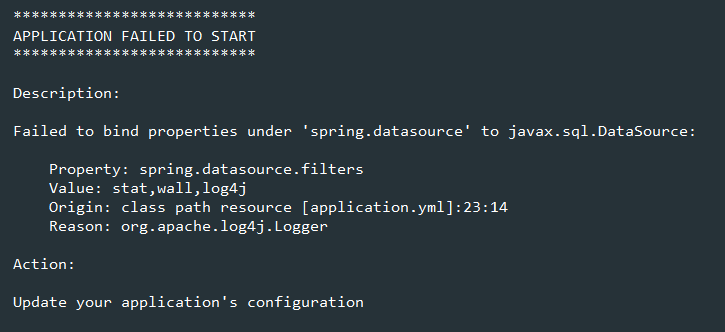
注意:需要添加 log4j 的依赖,否者会报错
2. application.yml
spring:
  datasource:
    username: root
    password:
    url: jdbc:mysql://localhost:3306/jdbc
    driver-class-name: com.mysql.jdbc.Driver
    type: com.alibaba.druid.pool.DruidDataSource
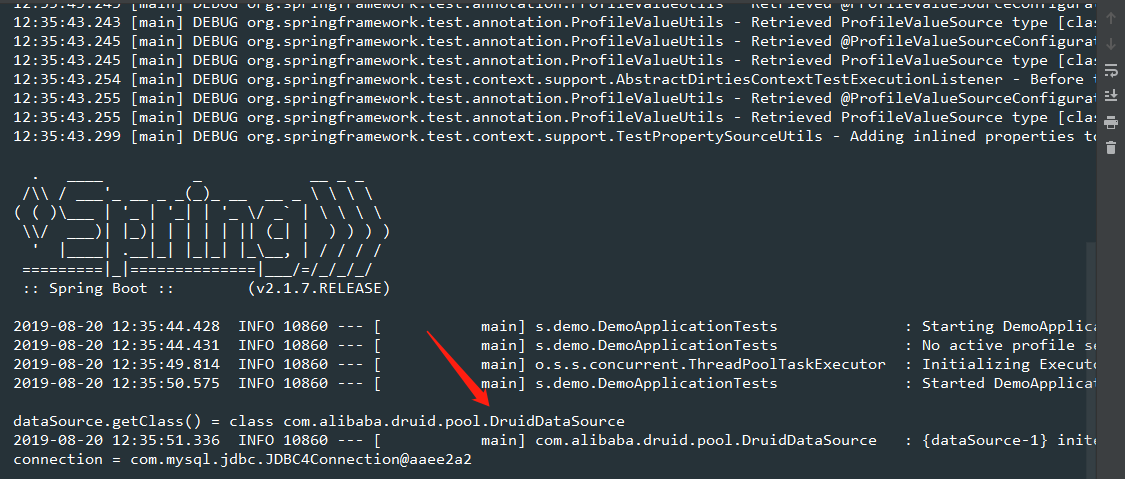
3. 测试类检测是否切换成功
package springbootdatajdbc.demo;

import org.junit.Test;
import org.junit.runner.RunWith;
import org.springframework.beans.factory.annotation.Autowired;
import org.springframework.boot.test.context.SpringBootTest;
import org.springframework.test.context.junit4.SpringRunner;

import javax.sql.DataSource;
import java.sql.Connection;
import java.sql.SQLException;

@RunWith(SpringRunner.class)
@SpringBootTest
public class DemoApplicationTests {

    @Autowired
    DataSource dataSource;

    @Test
    public void contextLoads() throws SQLException {
        System.out.println("dataSource.getClass() = " + dataSource.getClass());
        Connection connection = dataSource.getConnection();
        System.out.println("connection = " + connection);
        connection.close();
    }
}
4. Druid数据源其他配置
spring:
  datasource:
    username: root
    password:
    url: jdbc:mysql://localhost:3306/jdbc
    driver-class-name: com.mysql.jdbc.Driver
    type: com.alibaba.druid.pool.DruidDataSource

    #   数据源其他配置
    initialSize: 5
    minIdle: 5
    maxActive: 20
    maxWait: 60000
    timeBetweenEvictionRunsMillis: 60000
    minEvictableIdleTimeMillis: 300000
    validationQuery: SELECT 1 FROM DUAL
    testWhileIdle: true
    testOnBorrow: false
    testOnReturn: false
    poolPreparedStatements: true

    #   配置监控统计拦截的filters,去掉后监控界面sql无法统计,'wall'用于防火墙
    filters: stat,wall,log4j
    maxPoolPreparedStatementPerConnectionSize: 20
    useGlobalDataSourceStat: true
    connectionProperties: druid.stat.mergeSql=true;druid.stat.slowSqlMillis=500
5. Druid的配置类
package springbootdatajdbc.demo.config;

import com.alibaba.druid.pool.DruidDataSource;
import com.alibaba.druid.support.http.StatViewServlet;
import com.alibaba.druid.support.http.WebStatFilter;
import org.springframework.boot.context.properties.ConfigurationProperties;
import org.springframework.boot.web.servlet.FilterRegistrationBean;
import org.springframework.boot.web.servlet.ServletRegistrationBean;
import org.springframework.context.annotation.Bean;
import org.springframework.context.annotation.Configuration;

import javax.sql.DataSource;
import java.util.Arrays;
import java.util.HashMap;
import java.util.Map;

/**
 * @program: spring-boot-data-jdbc
 * @description: Druid配置类
 * @author: YuanChangYue
 * @create: 2019-08-20 12:40
 */
@Configuration
public class DruidConfig {

    @ConfigurationProperties(prefix = "spring.datasource")
    @Bean
    public DataSource druid() {
        return new DruidDataSource();
    }

  /**
     * 配置后台监控
     * 1 . 配置管理后台的Servlet
     */
    @Bean
    public ServletRegistrationBean statViewServlet() {
        ServletRegistrationBean<StatViewServlet> bean = new ServletRegistrationBean<>(new StatViewServlet(), "/druid/*");
        Map<String, String> initParams = new HashMap<>();
        initParams.put("loginUsername", "admin");
        initParams.put("loginPassword", "123456");
        initParams.put("allow", "");

        bean.setInitParameters(initParams);
        return bean;
    }

  /**
     * 2 . 配置监听web的filter
     */
  @Bean
  public FilterRegistrationBean webStatFilter() {
    FilterRegistrationBean<WebStatFilter> bean = new FilterRegistrationBean<>(new WebStatFilter());
    Map<String, String> initParams = new HashMap<>();
    initParams.put("exclusions", "*.js,*.css,/druid/*");
    bean.setInitParameters(initParams);
    bean.setUrlPatterns(Arrays.asList("/*"));
    return bean;
  }
}
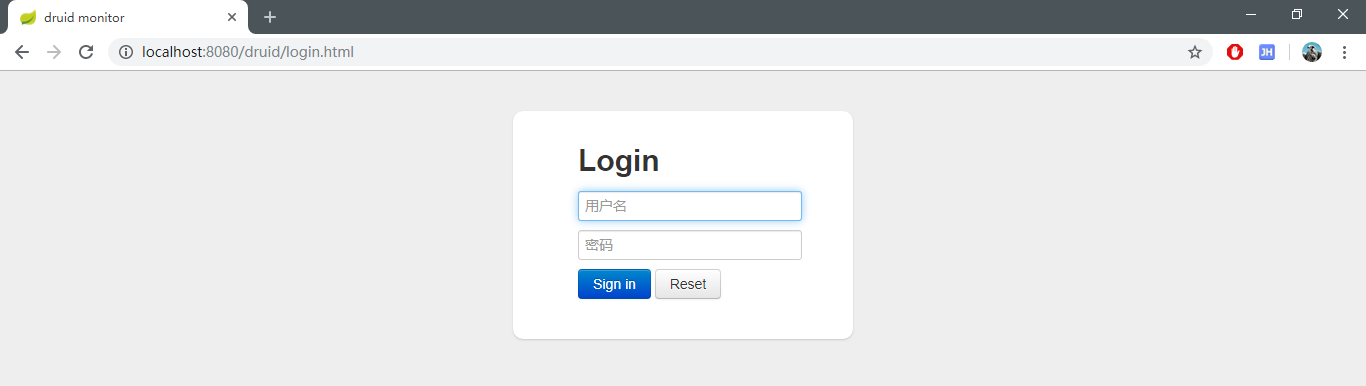
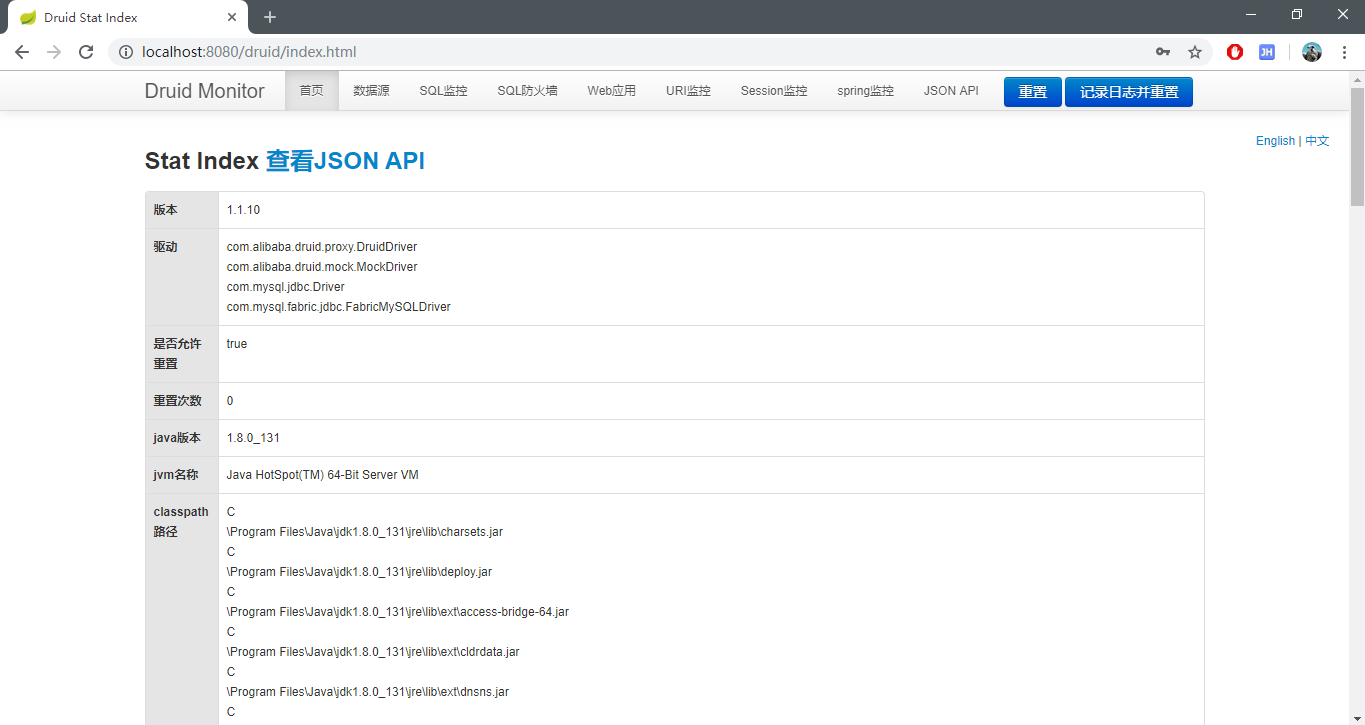
最后访问 : http://localhost:8080/druid
整合MyBatis
1. 添加依赖
<?xml version="1.0" encoding="UTF-8"?>
<project xmlns="http://maven.apache.org/POM/4.0.0" xmlns:xsi="http://www.w3.org/2001/XMLSchema-instance"
         xsi:schemaLocation="http://maven.apache.org/POM/4.0.0 https://maven.apache.org/xsd/maven-4.0.0.xsd">
    <modelVersion>4.0.0</modelVersion>
    <parent>
        <groupId>org.springframework.boot</groupId>
        <artifactId>spring-boot-starter-parent</artifactId>
        <version>2.1.7.RELEASE</version>
        <relativePath/> <!-- lookup parent from repository -->
    </parent>
    <groupId>spring-boot-data-mybatis</groupId>
    <artifactId>demo</artifactId>
    <version>0.0.1-SNAPSHOT</version>
    <name>demo</name>
    <description>Demo project for Spring Boot</description>

    <properties>
        <java.version>1.8</java.version>
    </properties>

    <dependencies>
        <dependency>
            <groupId>org.springframework.boot</groupId>
            <artifactId>spring-boot-starter-web</artifactId>
        </dependency>
        <dependency>
            <groupId>org.mybatis.spring.boot</groupId>
            <artifactId>mybatis-spring-boot-starter</artifactId>
            <version>2.1.0</version>
        </dependency>

        <!-- https://mvnrepository.com/artifact/com.alibaba/druid -->
        <dependency>
            <groupId>com.alibaba</groupId>
            <artifactId>druid</artifactId>
            <version>1.1.10</version>
        </dependency>

        <!-- https://mvnrepository.com/artifact/log4j/log4j -->
        <dependency>
            <groupId>log4j</groupId>
            <artifactId>log4j</artifactId>
            <version>1.2.17</version>
        </dependency>

        <dependency>
            <groupId>mysql</groupId>
            <artifactId>mysql-connector-java</artifactId>
            <scope>runtime</scope>
        </dependency>
        <dependency>
            <groupId>org.springframework.boot</groupId>
            <artifactId>spring-boot-starter-test</artifactId>
            <scope>test</scope>
        </dependency>
    </dependencies>

    <build>
        <plugins>
            <plugin>
                <groupId>org.springframework.boot</groupId>
                <artifactId>spring-boot-maven-plugin</artifactId>
            </plugin>
        </plugins>
    </build>

</project>

2. 创建实体类
package springbootdatamybatis.demo.bean;

/**
 * @program: spring-boot-data-mybatis
 * @description:
 * @author: YuanChangYue
 * @create: 2019-08-20 13:43
 */
public class Department {
    private Integer Id;
    private String departmentName;

    public Integer getId() {
        return Id;
    }

    public void setId(Integer id) {
        Id = id;
    }

    public String getDepartmentName() {
        return departmentName;
    }

    public void setDepartmentName(String departmentName) {
        this.departmentName = departmentName;
    }
}
package springbootdatamybatis.demo.bean;

/**
 * @program: spring-boot-data-mybatis
 * @description:
 * @author: YuanChangYue
 * @create: 2019-08-20 13:46
 */
public class Employee {
    private Integer id;
    private String lastName;
    private String email;
    private Integer gender;
    private int dId;

    public Integer getId() {
        return id;
    }

    public void setId(Integer id) {
        this.id = id;
    }

    public String getLastName() {
        return lastName;
    }

    public void setLastName(String lastName) {
        this.lastName = lastName;
    }

    public String getEmail() {
        return email;
    }

    public void setEmail(String email) {
        this.email = email;
    }

    public Integer getGender() {
        return gender;
    }

    public void setGender(Integer gender) {
        this.gender = gender;
    }

    public int getdId() {
        return dId;
    }

    public void setdId(int dId) {
        this.dId = dId;
    }
}
3. 注解版
package springbootdatamybatis.demo.mapper;

import org.apache.ibatis.annotations.*;
import org.springframework.stereotype.Repository;
import springbootdatamybatis.demo.bean.Department;

@Repository
@Mapper
public interface DepartmentMapper {

    @Select("select * from department where id = #{id} ")
    public Department getDepById(Integer id);

    @Delete("delete from department where id = #{id}")
    public int deleteDepById(Integer id);

    @Options(useGeneratedKeys = true, keyProperty = "id")
    @Insert("insert into department(departmentName) values(#{departmentName})")
    public int insertDept(Department department);

    @Update("update department set departmentName=#{departmentName} where id = #{id}")
    public int updateDept(Department department);

}
这里为了方便,没有加入serive层
package springbootdatamybatis.demo.controller;

import org.springframework.beans.factory.annotation.Autowired;
import org.springframework.stereotype.Controller;
import org.springframework.web.bind.annotation.GetMapping;
import org.springframework.web.bind.annotation.PathVariable;
import org.springframework.web.bind.annotation.ResponseBody;
import springbootdatamybatis.demo.bean.Department;
import springbootdatamybatis.demo.mapper.DepartmentMapper;

/**
 * @program: spring-boot-data-mybatis
 * @description: 部门控制器
 * @author: YuanChangYue
 * @create: 2019-08-20 13:56
 */
@Controller
public class DeptController {

    @Autowired
    DepartmentMapper departmentMapper;

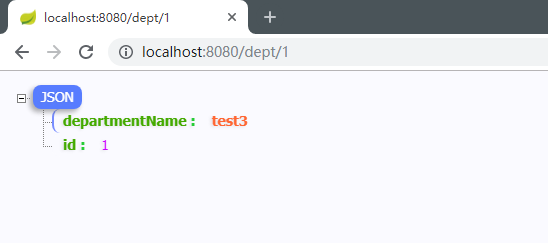
    @GetMapping("/dept/{id}")
    @ResponseBody
    public Department getDep(@PathVariable("id") Integer id) {
        return departmentMapper.getDepById(id);
    }

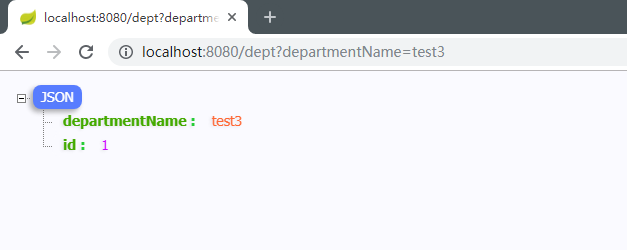
    @GetMapping("/dept")
    @ResponseBody
    public Department insertDept(Department department) {
        departmentMapper.insertDept(department);
        return department;
    }
}
package springbootdatamybatis.demo.config;

import org.mybatis.spring.boot.autoconfigure.ConfigurationCustomizer;
import org.springframework.context.annotation.Bean;
import org.springframework.context.annotation.Configuration;

/**
 * @program: spring-boot-data-mybatis
 * @description: Mybatis 配置类
 * @author: YuanChangYue
 * @create: 2019-08-20 15:47
 */
@Configuration
public class MybatisConfig {

    /**
     *  自定义配置 支持驼峰
     */
    @Bean
    public ConfigurationCustomizer configurationCustomizer() {
        return configuration -> configuration.setMapUnderscoreToCamelCase(true);
    }
}
4. mapper配置版
package springbootdatamybatis.demo.mapper;

import org.springframework.stereotype.Repository;
import springbootdatamybatis.demo.bean.Employee;

@Repository
public interface EmployeeMapper {

    public Employee getEmpById(Integer id);

}
<?xml version="1.0" encoding="UTF-8" ?>
<!DOCTYPE mapper
        PUBLIC "-//mybatis.org//DTD Mapper 3.0//EN"
        "http://mybatis.org/dtd/mybatis-3-mapper.dtd">
<mapper namespace="springbootdatamybatis.demo.mapper.EmployeeMapper">

    <select id="getEmpById" resultType="springbootdatamybatis.demo.bean.Employee">
        select * from employee where id  = #{id}
    </select>

</mapper>
<?xml version="1.0" encoding="UTF-8" ?>
<!DOCTYPE configuration
        PUBLIC "-//mybatis.org//DTD Config 3.0//EN"
        "http://mybatis.org/dtd/mybatis-3-config.dtd">
<configuration>
    <settings>
        <setting name="mapUnderscoreToCamelCase" value="true"/>
    </settings>
</configuration>
package springbootdatamybatis.demo.controller;

import org.springframework.beans.factory.annotation.Autowired;
import org.springframework.stereotype.Controller;
import org.springframework.web.bind.annotation.GetMapping;
import org.springframework.web.bind.annotation.PathVariable;
import org.springframework.web.bind.annotation.ResponseBody;
import springbootdatamybatis.demo.bean.Employee;
import springbootdatamybatis.demo.mapper.EmployeeMapper;

/**
 * @program: spring-boot-data-mybatis
 * @description:
 * @author: YuanChangYue
 * @create: 2019-08-20 16:20
 */
@Controller
public class EmpController {

    @Autowired
    EmployeeMapper employeeMapper;

    @ResponseBody
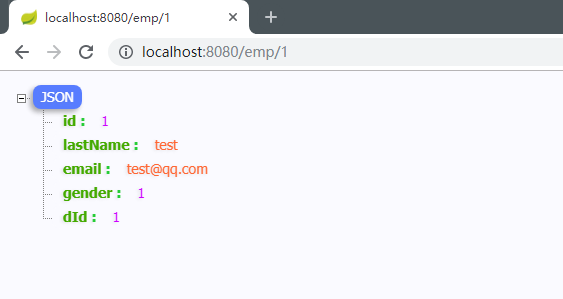
    @GetMapping("/emp/{id}")
    public Employee getEmpById(@PathVariable("id") Integer id) {
        return employeeMapper.getEmpById(id);
    }
}
spring:
  datasource:
    #   数据源基本配置
    username: root
    password:
    driver-class-name: com.mysql.jdbc.Driver
    url: jdbc:mysql://localhost:3306/mybatis
    type: com.alibaba.druid.pool.DruidDataSource
    #   数据源其他配置
    initialSize: 5
    minIdle: 5
    maxActive: 20
    maxWait: 60000
    timeBetweenEvictionRunsMillis: 60000
    minEvictableIdleTimeMillis: 300000
    validationQuery: SELECT 1 FROM DUAL
    testWhileIdle: true
    testOnBorrow: false
    testOnReturn: false
    poolPreparedStatements: true
    #   配置监控统计拦截的filters,去掉后监控界面sql无法统计,'wall'用于防火墙
    filters: stat,wall,log4j
    maxPoolPreparedStatementPerConnectionSize: 20
    useGlobalDataSourceStat: true
    connectionProperties: druid.stat.mergeSql=true;druid.stat.slowSqlMillis=500

#    schema:
#      - classpath:sql/department.sql
#      - classpath:sql/employee.sql
#    initialization-mode: always

mybatis:
  config-location: classpath:mybatis/mybatis-config.xml
  mapper-locations: classpath:mybatis/mapper/*
整合 SpringData JPA
1. 实体类
package com.changyue.springbootdatajpa.entity;

import javax.persistence.*;

/**
 * @program: spring-boot-data-jpa
 * @description: 用户
 * @author: YuanChangYue
 * @create: 2019-08-20 16:36
 */
@Entity
@Table(name = "tbl_user")
@JsonIgnoreProperties(value = {"hibernateLazyInitializer", "handler"})
public class User {
    @Id
    @GeneratedValue(strategy = GenerationType.IDENTITY)
    private Integer id;
    @Column(name = "last_name", length = 50)
    private String lastName;
    @Column
    private String email;

    public Integer getId() {
        return id;
    }

    public void setId(Integer id) {
        this.id = id;
    }

    public String getLastName() {
        return lastName;
    }

    public void setLastName(String lastName) {
        this.lastName = lastName;
    }

    public String getEmial() {
        return email;
    }

    public void setEmial(String emial) {
        this.email = emial;
    }
}
2. Dao接口
package com.changyue.springbootdatajpa.repository;


import com.changyue.springbootdatajpa.entity.User;
import org.springframework.data.jpa.repository.JpaRepository;

/**
 * 继承JpaRepository
 */
public interface UserRepository extends JpaRepository<User, Integer> {

}
3. 配置
spring:
  datasource:
    url: jdbc:mysql://localhost:3306/jpa
    username: root
    password:
    driver-class-name: com.mysql.jdbc.Driver

  jpa:
    hibernate:
      #更新和创建表结构
      ddl-auto: update
    #控制台显示sql
    show-sql: true
完成以上操作,会根据实体类在数据库中创建表

4. 简单查询
package com.changyue.springbootdatajpa.controller;

import com.changyue.springbootdatajpa.entity.User;
import com.changyue.springbootdatajpa.repository.UserRepository;
import org.springframework.beans.factory.annotation.Autowired;
import org.springframework.web.bind.annotation.GetMapping;
import org.springframework.web.bind.annotation.PathVariable;
import org.springframework.web.bind.annotation.RestController;

/**
 * @program: spring-boot-data-jpa
 * @description:
 * @author: YuanChangYue
 * @create: 2019-08-20 16:52
 */
@RestController
public class UserController {
    @Autowired
    UserRepository userRepository;

    /**
     * 简单通过id查询出use信息
     *
     * @return user json
     */
    @GetMapping("/user/{id}")
    public User getUserById(@PathVariable("id") Integer id) {
        return userRepository.getOne(id);
    }
}